March 16, 2012

Declutter your brain with one word


One word.

At the beginning of my yoga class, the instructor asks each of us to think of one word to keep in our mind, repeat and listen to throughout each practice. Several of my past words have been:

Balance.

Accept.

Inhabit.

Chocolate.

The idea of focusing on one word for a period of time has been profound for me. In daily life, so many other words run rampant through my brain: email check drive keys door lock credit keyboard ATM iPod headphones phone check meeting deadline call mistake...

Being able to focus, if just for an hour, on one simple word has allowed me to declutter my mind and re-balance in order to face another onslaught of daily words.

Photo by Per Ola Wiberg

February 14, 2012

MinimalistBeth


 Recently I have been watching the YouTube channel created by minimalistbeth, a woman who is in the process of slowly getting rid of the majority of her possessions in order to pay down debt, live simply and move back to her home in New York. Her basic and to the point videos are inspirational and reflect what a lot of Americans I'm sure are feeling: a desire to live with a lot less and to hopefully become happier and healthier in the process. Beth is now living in one room of her Phoenix apartment, has no car or TV and will soon be quitting her job and packing her minimalist wardrobe to fly off to a better life. Good luck Beth!

February 10, 2012

Simplify Your Signature

Over the years, my signature has gone from my full name (all 23 letters!) to just my first name and the initial of my last name and now it is just one large capital "C" to represent my first name. One woman at one store had the nerve to say that my single letter signature wasn't a signature. I boldly looked her right in the eye and told it it WAS a signature and it was mine.


How many things a day to you have to sign? Credit card receipts, purchase orders, FedEx or UPS packages, work items or paperwork? How much time could be saved by simplifying your signature. Before I reduced the size of my signature, I dreaded having to write out my name, now I actually enjoy writing that big, bold "C".

Photo by Hammer51012/Flickr

February 3, 2012

Phasing Out of Facebook

Facebook is on the brink of one of the largest IPO's in history. No one really knows what this will do for the millions of Facebook users and businesses, but we do know that it will make a few people very, very wealthy. Even with all the IPO hubbub, what if you decide you are tired of being part of the largest social media network in the world? How about dumping Facebook for good?


Many users of Facebook have shown their displeasure about the social media network's privacy issues, and according to a PCMag.com poll over 50 percent of Facebook users have considered moving over to Google+ instead.

If you are having a difficult time removing yourself from the most popular social network ever created, then do it in phases. Each phase will help any Facebook addict to slowly quit the pull of status posts, Farmville and the Timeline.

Phase #1

Cut down Facebook time to once or twice a week instead of daily. In addition to this, don't stay logged into Facebook all day. It makes it too tempting to just stop what you're doing and get lost in Facebook-land.

Stop putting your entire life on Facebook. Only post your status once or twice a week and don't let everyone know everything you are doing or every place you are going. 

Stop liking things on Facebook. Don't use your finger or your mouse to vote on what you "Like"; not even for that free pack of gum or entry into a movie ticket contest.


Phase #2

Lurk instead of Like. You can still lurk around Facebook and view other friends' comments, photos, videos, etc., but don't post any status updates or click on any "Like" buttons.

Tell them you are outta here. Contact your closest friends on FB and tell them you are slowly phasing out and give them your Google+ information, Twitter account or email address.

Move your photos over to Google+. The blog, nicomachus.net, has a nice guide on how to move your accumulation of photos from Facebook to Google+.

Phase #3

Delete your account. If this makes you nervous, you can reactivate your Facebook account after 14 days of deleting it. If after 14 days, you are having withdrawals, you can always go back.

January 26, 2012

Tucking it Away

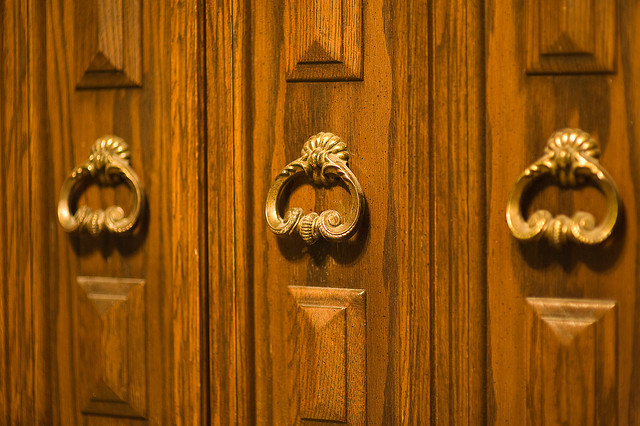
 I'm on the lookout for a small cabinet armoire to put in my office in which to house my small collection of books and office supplies. The length, width, color, wood doesn't matter so much as it has to have doors that can close.


The simple act of closing the doors on something as basic as some books, files and paperwork can be powerful. It's a mental vacation from items that remind you of work, study, to-do lists, receipts and bills. When the doors are open, it's time to work; when they are closed, it's time to relax and play.

Besides, open shelves collect dust.

Photo by Dave Jones/Flickr

December 21, 2011

End of Year Decluttering


Another year is about to end, and leaving with it should be the detritus that tends to gather over the months. The end of the year is a great time to clean up your email, clean up that cluttered computer desktop and maybe even dump a few friends on Facebook. Even though this cleaning session is only for electronic clutter, the mass of information can weigh heavily on your psyche.

Here are the three things that I will be doing to welcome 2012 with a fresh outlook:

1. Clean up email inboxes

Why does it seem like at the end of each year I get the dreaded "Your inbox is nearly full" message? Oh yes, I've been just keeping everything (and their attachments) in my inbox. I will be dumping both received and sent messages that are over 8 months old and I will be saving some messages and their attachments in a Dropbox account or in a file that is related to the project. I also remove emails that are rated as "Enormous".

I will be doing this with both my work and personal email accounts. Remember to also clean out any email accounts that you use primarily for forwarding purposes and to dump the Trash for each account.


2. Organize projects

Do a full backup of all your 2011 projects. Then do a backup of your backup. I have three systems of backups: an off-site server, an external hard drive and on DVD. The server and external drive are for more current projects, while the DVD is usually for projects that are three or more months old. Getting old projects out of your sight will enable you to concentrate more on the current projects.


3. Clean up Facebook

Facebook is used for everything now including logging onto other sites, posting comments and creating accounts. The end of the year is a good time to remove yourself from groups you are no longer interested in, to dump old (and potentially embarrassing) photos, remove apps that have access to your account, and remove old messages.

Take a good look at your "friends". Can some of them quietly disappear? If you are not interested in being friends with random people, then click on the Friends area of your account, click their checked Friends box and scroll down to Unfriend. It's painless.

Now, to remedy removing a few of your friends, take some time to catch up with your true friends on Facebook. Send a note to someone you have been meaning to say hello to for a while and maybe plan an off-Facebook meet-up.

Photo courtesy of Muffet/Flickr

December 5, 2011

The Capsule Wardrobe


 Wikipedia calls a "capsule wardrobe" a set of clothing, normally around 24 items, which can be mixed and matched to create a wide variety of outfits. The idea is aimed at people who want to make the most of a small clothing budget, or people who find that they spend a lot of money on clothes that they never wear.

My already minimized wardrobe will be getting a capsule makeover as well. I'm determined to get my clothing items down to 20 pieces. On top of those 20 pieces will be a few hats, scarfs and some jewelry to dress each item up or down.

The keys parts of a capsule wardrobe are:

1. Each item should go with several other items. You should be able to pair a shirt with several pants and skirts and a pair of shoes with many different outfits.

2. Keep to several colors. Have you seen those massive wardrobes that look like a fabric rainbow? There are so many clothes that they need to be color coordinated. Keep your wardrobe to four or five basic colors. Mine happen to be black, gray, purple/mauve/blue and red.

3. Make sure you love each item. In this previous blog post, I said you should look at your closet as if you are going to a party. Do you walk into the party and see all your best friends, or do walk in and see only people you don't know? Each item of clothing should fit, be comfortable and you should want to reach for them over and over again.

The difficult part is how to have a capsule wardrobe when you live in an area with four distinct seasons. The lightweight blouses in my closet have to share space with bulky fleece, flip-flops have to share space with clunky winter boots. So, I've decided to have a capsule wardrobe for warm weather and a capsule wardrobe for cold weather. Items from the warm weather section can also be used (T-shirts, long sleeve T-shirts) as layers for winter.

Now, my goal is just to look as fabulous as Miss Golightly.

Photo courtesy of pwbaker/Flickr